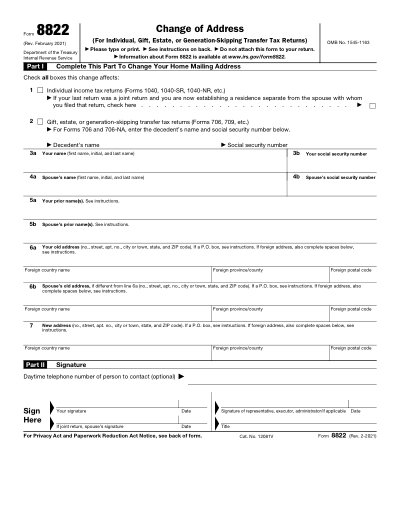
Formulario IRS 8822

Plantilla Imprimible 2025

Excelente Trustpilot stars 42.014 reseñas en

This website is not affiliated with any government agency or tax authority.
Última actualización del formulario: 03/2024. Verifica que esta sea la versión actual antes de usarla.

Completa y envía fácilmente tu formulario 8822

Sigue estos sencillos pasos para completar, firmar y enviar tu formulario 8822 en línea.

01

Llena tu formulario

Nuestro editor fácil de usar te ayuda a ingresar rápidamente datos personales y comerciales en la plantilla 8822.

02

Firma el formulario

Agrega tu firma electrónica al formulario rellenable 8822 para certificar que proviene directamente de ti.

03

Envíalo al solicitante

Descarga e imprime o comparte al instante tu 8822 firmado con el solicitante.

¿Cómo llenar un 8822 en línea?

Sigue estos pasos para completar tu formulario 8822 en línea.

Step 01

Open Form 8822 in our PDF editor.

Step 02

Check the boxes for the tax return types affected by the address change.

Step 03

Fill in taxpayer and spouse information when applicable.

Step 04

Enter the old and new mailing addresses.

Step 05

Sign and date the form.

Step 06

Download or print the completed form and mail it to the IRS address listed in the form instructions.

¿Para qué se usa un 8822?

Form 8822 is used to notify the IRS about a change to your home mailing address for individual, gift, estate, or generation-skipping transfer tax returns. Fill the form in our PDF editor, then print, sign, and mail it to the IRS address listed in the form instructions.

Quién necesita llenar un formulario 8822

Individuals, spouses, authorized representatives, executors, or administrators who need to update a taxpayer's home mailing address with the IRS.

What is Form 8822?

Form 8822 is used to tell the IRS about a change to your home mailing address.

Can I fill Form 8822 online here?

Yes. Open the form in our PDF editor, fill in your details, then download or print the completed form.

Do I attach Form 8822 to my tax return?

No. The IRS instructions state that Form 8822 should be mailed separately, not attached to your return.

Where do I mail Form 8822?

Mail it to the IRS address listed in the form instructions, which depends on the state where you previously lived.

¿Listo para Llenar Tu Formulario 8822?

Comienza a llenar tu formulario en línea en minutos. Rápido, seguro y completamente gratis.

Our users speak for themselves

Calidad excepcional verificada por profesionales reales.

Great
Trustpilot
Verified

"The folks at PDFocused were just wonderful at helping me resolve a very important issue. I would highly recommend them because there is someone actually paying attention and reaching out to help those who use their service!"

E

Eugene

Mar 20, 2026

Verified

"I wanted to convert a PDF quickly and this tool made it very easy. Everything worked great, and I didn't have to deal with any confusing process."

B

Bosmat Shelef

Feb 4, 2026

Verified

"I needed to convert a PDF quickly and this tool made it easy. Everything worked as expected and I didn't have to deal with any confusing steps."

E

Elibz

Feb 4, 2026

Verified

"Super great and easy to use"

D

Drew Mascia

Feb 28, 2026

Preguntas Frecuentes

¿Qué es PDFocused?
PDFocused es un conjunto de herramientas de PDF y documentos en línea que te permite editar, rellenar, combinar, dividir, comprimir, rotar, convertir y aplicar OCR a archivos directamente desde tu navegador. También ofrece páginas de formularios listos para usar y un editor en el navegador para flujos de trabajo habituales.
¿Es seguro usar PDFocused?
Sí. PDFocused está diseñado con un enfoque de seguridad prioritario para la gestión de cargas y cuentas, con infraestructura segura y una gestión controlada del ciclo de vida de los archivos. Los archivos temporales se procesan y eliminan automáticamente, y las operaciones de cuenta/suscripción se realizan mediante flujos verificados.
¿PDFocused es por suscripción o se paga una sola vez?
PDFocused utiliza un modelo de suscripción con varios planes, incluyendo acceso tipo prueba y opciones recurrentes. La visibilidad de los planes puede variar según el historial del usuario (por ejemplo, elegibilidad para la prueba), y el acceso a ofertas especiales puede depender de la elegibilidad de la cuenta.
¿Cómo edito un PDF en PDFocused?
Abre PDFocused, sube tu archivo y lanza el editor. Puedes rellenar campos, ajustar el contenido y aplicar operaciones sobre el documento. Cuando termines, exporta o descarga tu archivo actualizado desde el mismo flujo.
¿Qué funciones principales incluye PDFocused?
PDFocused admite edición de PDF, relleno de formularios, combinar, dividir, eliminar páginas, rotar páginas, comprimir PDF, OCR y varias herramientas de conversión (como PDF a imágenes, imágenes a PDF, PDF a DOCX, Office a PDF, PDF a EPUB/RTF/Excel y conversión de formatos de imagen).
¿Qué tipos de archivo admite PDFocused?
PDFocused admite principalmente flujos con PDF y también soporta conversiones habituales de Office e imagen mediante herramientas dedicadas, incluyendo formatos de documento e imagen utilizados en flujos de trabajo estándar.
¿Qué debo hacer si encuentro un error?
Si algo falla, reintenta la operación con una nueva carga/sesión. Si el problema persiste, contacta con el soporte de PDFocused usando el canal de soporte indicado en el pie de la página para que el equipo pueda investigar con los detalles de tu cuenta/sesión.
¿Cómo elijo la herramienta de PDF en línea adecuada?

Comprueba que la plataforma cubra todo tu flujo (editar + convertir + comprimir + formularios), que ofrezca una gestión fiable de cuenta/facturación y que procese tus archivos de forma segura con canales de soporte claros. PDFocused está diseñada como un flujo integral en el navegador para que no tengas que saltar entre varias herramientas.
/ 1
100%