Other 양식 SU684

2025 인쇄용 양식

완료 Trustpilot stars 42,014개의 리뷰

This website is not affiliated with any government agency or tax authority.
양식 최종 업데이트: 2024년 3월. 사용 전 최신 버전인지 확인하세요.

SU684 양식을 간편하게 작성하고 제출하세요

아래 단계를 따라 SU684 양식을 온라인으로 작성, 서명, 제출하세요.

01

양식 작성

직관적인 편집기로 SU684 양식에 개인 정보 및 비즈니스 정보를 빠르게 입력할 수 있습니다.

02

양식 서명

SU684 양식에 전자 서명을 추가하여 본인이 직접 작성한 문서임을 확인하세요.

03

담당자에게 전송

서명이 완료된 SU684 양식을 다운로드하여 즉시 인쇄하거나 담당자에게 공유하세요.

SU684을(를) 온라인으로 작성하는 방법

아래 단계에 따라 SU684 양식을 온라인으로 작성하세요.

Step 01

Access the form through our PDF editor without the need for uploads.

Step 02

Fill in your personal details and healthcare provider's information.

Step 03

Describe your medical condition and its impact on daily activities.

Step 04

Review the form for accuracy before downloading it as a PDF.

SU684은(는) 어떤 용도로 사용하나요?

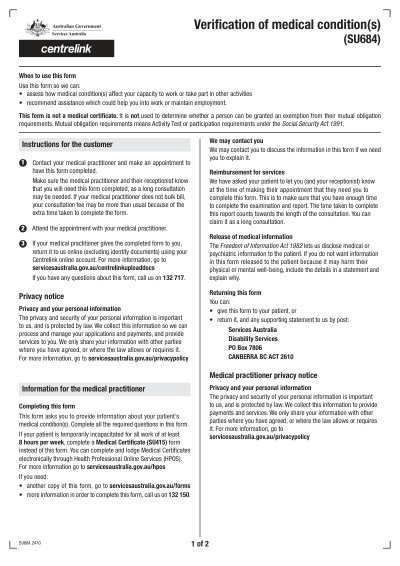
Form SU684 is used to collect detailed information about an individual's medical conditions and their impact on daily activities and work capabilities. This form helps Services Australia determine eligibility for support and assistance tailored to the individual's needs. Accurate completion is important for proper evaluations and recommendations.

SU684 양식 작성 대상

Individuals seeking assessment for government assistance must have this form completed by their medical practitioner.

What is the purpose of Form SU684?

It collects information about medical conditions to assess work capacity and eligibility for government assistance.

Who is responsible for completing Form SU684?

The individual must have their medical practitioner complete this form for submission to Services Australia.

How do I submit Form SU684?

The form can be submitted by mail or in person to a Centrelink office.

SU684 양식, 지금 바로 작성해 보세요

몇 분 안에 온라인으로 양식 작성을 시작하세요. 빠르고 안전하며 완전 무료입니다.

Our users speak for themselves

전문가들이 직접 검증한 높은 품질.

Great
Trustpilot
Verified

"The folks at PDFocused were just wonderful at helping me resolve a very important issue. I would highly recommend them because there is someone actually paying attention and reaching out to help those who use their service!"

E

Eugene

Mar 20, 2026

Verified

"I wanted to convert a PDF quickly and this tool made it very easy. Everything worked great, and I didn't have to deal with any confusing process."

B

Bosmat Shelef

Feb 4, 2026

Verified

"I needed to convert a PDF quickly and this tool made it easy. Everything worked as expected and I didn't have to deal with any confusing steps."

E

Elibz

Feb 4, 2026

Verified

"Super great and easy to use"

D

Drew Mascia

Feb 28, 2026

자주 묻는 질문

PDFocused은 어떤 서비스인가요?
PDFocused은 브라우저에서 바로 PDF 및 문서를 편집, 작성, 합치기, 나누기, 압축, 회전, 변환, OCR 처리할 수 있는 온라인 문서 도구입니다. 바로 사용 가능한 양식 페이지와 다양한 문서 작업을 위한 브라우저 기반 편집기도 제공합니다.
PDFocused은 안전하게 사용할 수 있나요?
네. PDFocused은 파일 업로드와 계정 처리 전 과정에 보안을 최우선으로 설계되었습니다. 안전한 인프라와 체계적인 파일 수명 주기 관리를 통해 임시 파일은 처리 후 자동으로 삭제되며, 계정 및 구독 관련 작업은 검증된 백엔드 프로세스를 통해 처리됩니다.
PDFocused은 구독형인가요, 아니면 일회성 결제인가요?
PDFocused은 구독 기반 서비스로, 무료 체험 및 정기 구독을 포함한 다양한 요금제를 제공합니다. 이용 가능한 요금제는 사용자 이력(예: 무료 체험 자격)에 따라 다를 수 있으며, 특별 혜택 접근 여부도 계정 자격 조건에 따라 결정됩니다.
PDFocused에서 PDF를 편집하려면 어떻게 하나요?
PDFocused에 접속한 후 파일을 업로드하고 편집기를 실행하세요. 필드 작성, 내용 수정, 문서 작업 적용이 가능합니다. 편집이 완료되면 동일한 화면에서 파일을 내보내거나 다운로드할 수 있습니다.
PDFocused의 주요 기능은 무엇인가요?
PDFocused은 PDF 편집, 양식 작성, PDF 합치기, PDF 나누기, 페이지 삭제, 페이지 회전, PDF 압축, OCR, 그리고 다양한 변환 도구를 지원합니다. 변환 도구로는 PDF를 이미지로, 이미지를 PDF로, PDF를 DOCX로, Office 문서를 PDF로, PDF를 EPUB/RTF/Excel 표로 변환하는 기능과 이미지 형식 변환 도구 등이 포함됩니다.
PDFocused에서 지원하는 파일 형식은 무엇인가요?
PDFocused은 PDF 기반 작업을 중심으로 하며, 전용 도구를 통해 일반적인 Office 문서 및 이미지 변환도 지원합니다. 업무 환경에서 널리 사용되는 문서 및 이미지 형식을 폭넓게 지원합니다.
오류가 발생하면 어떻게 해야 하나요?
오류가 발생한 경우, 파일을 다시 업로드하거나 새 세션에서 작업을 재시도해 보세요. 문제가 계속된다면 사이트 하단의 고객지원 채널을 통해 PDFocused 지원팀에 문의해 주세요. 계정 및 세션 정보를 바탕으로 신속하게 확인해 드립니다.
나에게 맞는 온라인 PDF 도구는 어떻게 선택하나요?
편집, 변환, PDF 압축, 양식 작성 등 필요한 기능을 모두 갖추고 있는지, 계정 관리와 결제가 안정적으로 운영되는지, 그리고 안전한 처리 환경과 명확한 고객지원 채널을 제공하는지 확인하세요. PDFocused은 여러 도구를 오가지 않아도 되도록 브라우저에서 모든 PDF 작업을 한 번에 처리할 수 있는 올인원 솔루션으로 설계되었습니다.
/ 1
100%
