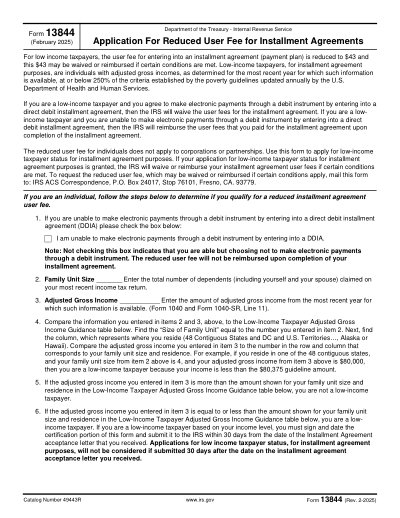
IRS 表單 13844

2025 可列印範本

太好了 Trustpilot stars 42,014 則評價,來自

This website is not affiliated with any government agency or tax authority.
表單最後更新時間:2024 年 3 月。使用前請確認此為最新版本。

輕鬆完成並提交您的 13844 表單

依照以下簡單步驟,線上填寫、簽署並送出您的 13844 表單。

01

填寫表單

我們直覺易用的編輯器,讓您快速填入個人或公司資料至 13844 表單範本。

02

簽署表單

在 13844 表單上加入您的電子簽名,確認文件由您本人親自提交。

03

傳送給申請方

下載已簽署的 13844,立即列印或分享給申請方。

如何線上填寫 13844?

依照以下步驟,線上完成您的 13844 表單。

Step 01

Download Form 13844 from the IRS website.

Step 02

Complete all necessary fields with accurate information.

Step 03

Review your entries for correctness.

Step 04

Sign the form as required.

Step 05

Submit the form to the IRS according to the instructions provided.

13844 的用途是什麼?

Form 13844 is used by taxpayers to apply for a reduced user fee for an installment agreement with the IRS. This form is necessary for those who meet the low-income criteria and wish to pay their tax liability over time with a reduced fee.

哪些人需要填寫 13844 表單

Taxpayers who meet the low-income criteria and are seeking a reduced user fee for an IRS installment agreement.

Can I apply for a reduced user fee if I don't meet the low-income criteria?

No, only taxpayers who meet the low-income criteria are eligible for a reduced user fee.

How do I know if I qualify for the reduced fee?

Eligibility is based on your income level. Refer to the IRS guidelines for low-income criteria.

What should I do if I realize I've made an error after submitting?

Contact the IRS immediately to discuss your options, which may include resubmitting the form with correct information.

準備好填寫 13844 了嗎?

幾分鐘內即可線上填寫表單,快速、安全、完全免費。

Our users speak for themselves

經專業人士親身驗證的卓越品質。

Great
Trustpilot
Verified

"The folks at PDFocused were just wonderful at helping me resolve a very important issue. I would highly recommend them because there is someone actually paying attention and reaching out to help those who use their service!"

E

Eugene

Mar 20, 2026

Verified

"I wanted to convert a PDF quickly and this tool made it very easy. Everything worked great, and I didn't have to deal with any confusing process."

B

Bosmat Shelef

Feb 4, 2026

Verified

"I needed to convert a PDF quickly and this tool made it easy. Everything worked as expected and I didn't have to deal with any confusing steps."

E

Elibz

Feb 4, 2026

Verified

"Super great and easy to use"

D

Drew Mascia

Feb 28, 2026

常見問題 FAQ

PDFocused 是什麼?
PDFocused 是一款線上 PDF 與文件處理工具,讓您直接在瀏覽器中編輯、填寫、合併、分割、壓縮、旋轉、轉換 PDF,以及執行 OCR 文字辨識。此外,還提供現成的表單頁面與內建編輯器,滿足各種常見的文件處理需求。
PDFocused 安全嗎?
安全有保障。PDFocused 在檔案上傳與帳號操作上均採用安全優先的處理機制,包含安全基礎架構與嚴格的檔案生命週期管理。暫存檔案會在處理完成後自動清除,帳號與訂閱相關操作也透過經過驗證的後端流程進行處理。
PDFocused 是訂閱制還是買斷制?
PDFocused 採用訂閱制,提供多種方案選擇,包含試用性質的短期方案與定期續訂方案。可顯示的方案內容可能因使用者資格而有所不同(例如是否符合試用資格),特殊優惠的使用權限也可能依帳號條件而異。
如何在 PDFocused 上編輯 PDF?
開啟 PDFocused 後,上傳您的檔案並進入編輯器。您可以填寫欄位、調整內容,並執行各種文件操作。完成後,直接在同一介面匯出或下載更新後的檔案即可。
PDFocused 提供哪些核心功能?
PDFocused 支援 PDF 編輯、表單填寫、合併、分割、刪除頁面、旋轉頁面、壓縮 PDF、OCR 文字辨識,以及多種轉換工具(包含 PDF 轉圖片、圖片轉 PDF、PDF 轉 DOCX、Office 文件轉 PDF、PDF 轉 EPUB/RTF/Excel 表格,以及圖片格式轉換工具)。
PDFocused 支援哪些檔案格式?
PDFocused 以 PDF 文件處理為核心,同時透過專屬工具支援常見的 Office 文件與圖片格式轉換,涵蓋一般商務工作流程中常用的文件與圖片格式。
遇到錯誤時該怎麼辦?
若操作失敗,請重新上傳檔案並再試一次。若問題持續發生,請透過網站頁尾所示的客服管道聯繫 PDFocused 支援團隊,以便團隊根據您的帳號與操作記錄進行進一步排查。
如何選擇合適的線上 PDF 工具?
建議確認該平台是否涵蓋您的完整需求(編輯、轉換、壓縮、表單填寫),並具備可靠的帳號與付款處理機制,同時提供安全的檔案處理流程與清楚的客服管道。PDFocused 專為一站式瀏覽器工作流程設計,讓您無需在多個工具之間來回切換。
/ 1
100%
