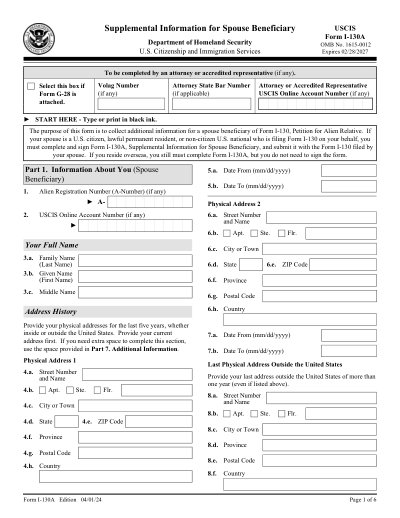
USCIS-formulier I-130A

Afdrukbare sjabloon 2025

Geweldig Trustpilot stars 42.014 beoordelingen op

This website is not affiliated with any government agency or tax authority.
Formulier voor het laatst bijgewerkt: 03/2024. Controleer vóór gebruik of dit de actuele versie is.

Vul je I-130A-formulier eenvoudig in en verstuur het

Volg deze stappen om je I-130A-formulier online in te vullen, te ondertekenen en te verzenden.

01

Vul je formulier in

Met onze gebruiksvriendelijke editor voer je snel persoonlijke en zakelijke gegevens in het I-130A-sjabloon in.

02

Onderteken het formulier

Voeg je elektronische handtekening toe aan het invulbare I-130A-formulier om te bevestigen dat het van jou afkomstig is.

03

Stuur het naar de ontvanger

Download en print je ondertekende I-130A direct af, of deel het met de ontvanger.

Hoe vul je een I-130A online in?

Volg deze stappen om je I-130A-formulier online in te vullen.

Step 01

Access the form using the online PDF editor or download it from the USCIS website.

Step 02

Fill in all required personal and biographical details accurately.

Step 03

Provide previous addresses and employment information as needed.

Step 04

If applicable, include the interpreter's details.

Step 05

Ensure the form is signed and dated before submission.

Waar wordt een I-130A voor gebruikt?

Form I-130A is used to provide additional information about the spouse beneficiary of a U.S. citizen or lawful permanent resident who is filing Form I-130, Petition for Alien Relative. It helps USCIS verify the relationship and gather necessary details about the spouse beneficiary.

Wie moet een I-130A-formulier invullen?

The spouse beneficiary of a U.S. citizen or lawful permanent resident filing Form I-130 must complete this form if they are residing outside the United States.

What is Form I-130A?

Form I-130A is used to collect additional information about a spouse beneficiary of a U.S. citizen or lawful permanent resident filing Form I-130.

Who is required to fill out Form I-130A?

The spouse beneficiary must complete Form I-130A if they are residing outside the United States as part of the Form I-130 petition process.

When is Form I-130A not necessary?

Form I-130A is not required if the spouse beneficiary is residing in the United States.

Where should I file Form I-130A?

Form I-130A should be submitted along with Form I-130 to the designated USCIS address based on the petitioner's location.

What is the cost associated with filing Form I-130A?

There is no separate fee for Form I-130A, but Form I-130 has a filing fee.

Klaar om je I-130A-formulier in te vullen?

Begin binnen enkele minuten met het online invullen van je formulier. Snel, veilig en volledig gratis.

Our users speak for themselves

Uitstekende kwaliteit, bevestigd door echte professionals.

Great
Trustpilot
Verified

"The folks at PDFocused were just wonderful at helping me resolve a very important issue. I would highly recommend them because there is someone actually paying attention and reaching out to help those who use their service!"

E

Eugene

Mar 20, 2026

Verified

"I wanted to convert a PDF quickly and this tool made it very easy. Everything worked great, and I didn't have to deal with any confusing process."

B

Bosmat Shelef

Feb 4, 2026

Verified

"I needed to convert a PDF quickly and this tool made it easy. Everything worked as expected and I didn't have to deal with any confusing steps."

E

Elibz

Feb 4, 2026

Verified

"Super great and easy to use"

D

Drew Mascia

Feb 28, 2026

Veelgestelde vragen

Wat is PDFocused?
PDFocused is een online PDF- en documenttoolkit waarmee je bestanden direct in je browser kunt bewerken, invullen, samenvoegen, splitsen, comprimeren, roteren, converteren en OCR kunt toepassen. Daarnaast biedt het kant-en-klare formulierpagina's en een ingebouwde editor voor veelgebruikte documenttaken.
Is PDFocused veilig te gebruiken?
Ja. PDFocused is gebouwd met beveiliging als uitgangspunt: uploads en accountbeheer verlopen via beveiligde infrastructuur met gecontroleerd bestandsbeheer. Tijdelijke bestanden worden automatisch verwerkt en verwijderd, en account- en abonnementsbewerkingen worden afgehandeld via geverifieerde backend-processen.
Werkt PDFocused met een abonnement of is het een eenmalige aankoop?
PDFocused werkt op basis van een abonnementsmodel met meerdere opties, waaronder proeftoegang en doorlopende abonnementen. Welke abonnementen zichtbaar zijn, kan variëren op basis van je accountgeschiedenis (zoals proefperiode-geschiktheid), en toegang tot speciale aanbiedingen kan afhangen van je accountstatus.
Hoe bewerk ik een PDF in PDFocused?
Open PDFocused, upload je bestand en start de editor. Je kunt velden invullen, inhoud aanpassen en documentbewerkingen uitvoeren. Als je klaar bent, exporteer of download je het bijgewerkte bestand vanuit dezelfde werkstroom.
Welke kernfuncties biedt PDFocused?
PDFocused ondersteunt PDF bewerken, formulieren invullen, samenvoegen, splitsen, pagina's verwijderen, pagina's roteren, PDF comprimeren, OCR en diverse conversietools (zoals PDF naar afbeeldingen, afbeeldingen naar PDF, PDF naar DOCX, Office naar PDF, PDF naar EPUB/RTF/Excel-tabellen en tools voor afbeeldingsformaatconversie).
Welke bestandstypen ondersteunt PDFocused?
PDFocused is primair gericht op PDF-workflows en ondersteunt daarnaast gangbare Office- en afbeeldingsconversies via speciale tools, inclusief document- en afbeeldingsformaten die in standaard zakelijke workflows worden gebruikt.
Wat doe ik als er een fout optreedt?
Probeer de bewerking opnieuw met een nieuw geüpload bestand of een nieuwe sessie. Blijft het probleem bestaan, neem dan contact op met de PDFocused-support via het supportkanaal in de voettekst van de site, zodat het team het probleem kan onderzoeken aan de hand van je account- of sessiegegevens.
Hoe kies ik de juiste online PDF-tool?

Controleer of het platform je volledige workflow dekt (bewerken, converteren, comprimeren en formulieren), betrouwbaar omgaat met accounts en facturering, en veilige verwerking biedt met duidelijke supportmogelijkheden. PDFocused is ontworpen als een alles-in-één browseroplossing, zodat je niet steeds tussen verschillende tools hoeft te wisselen.
/ 1
100%