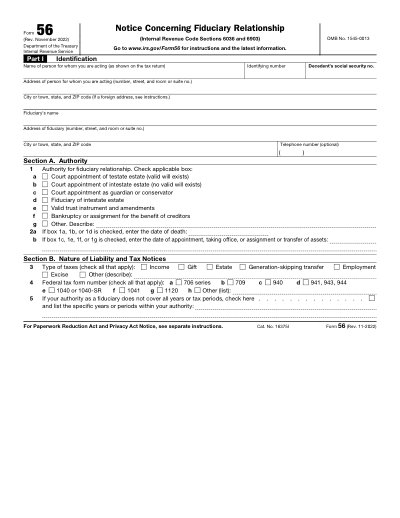
Afdrukbare sjabloon 2025
This website is not affiliated with any government agency or tax authority.
Formulier voor het laatst bijgewerkt: 03/2024. Controleer vóór gebruik of dit de actuele versie is.
Vul je 56-formulier eenvoudig in en verstuur het
Volg deze stappen om je 56-formulier online in te vullen, te ondertekenen en te verzenden.
Vul je formulier in
Met onze gebruiksvriendelijke editor voer je snel persoonlijke en zakelijke gegevens in het 56-sjabloon in.
Onderteken het formulier
Voeg je elektronische handtekening toe aan het invulbare 56-formulier om te bevestigen dat het van jou afkomstig is.
Stuur het naar de ontvanger
Download en print je ondertekende 56 direct af, of deel het met de ontvanger.
Hoe vul je een 56 online in?
Volg deze stappen om je 56-formulier online in te vullen.
Step 01
Access Form 56 from the IRS website or a PDF editor.
Step 02
Enter the fiduciary's name, address, and identification number.
Step 03
Provide the name and address of the person for whom you are acting.
Step 04
Indicate your authority by checking the appropriate boxes.
Step 05
If necessary, include the date of death or appointment.
Step 06
Complete the form and sign it to confirm accuracy.
Waar wordt een 56 voor gebruikt?
Wie moet een 56-formulier invullen?
When must a fiduciary file Form 56?
What happens if Form 56 is not filed?
Can Form 56 be e-filed?
Klaar om je 56-formulier in te vullen?
Begin binnen enkele minuten met het online invullen van je formulier. Snel, veilig en volledig gratis.
Our users speak for themselves
Uitstekende kwaliteit, bevestigd door echte professionals.
"The editing was very easy and easy to download the document."
Fouzia Barwari
Jun 2, 2026
"Quick easy and straightforward thank you"
MRS DAWN ANDREWS
May 23, 2026
"Simple efficient process. It all worked."
Sundeep Salins
Jun 3, 2026
"Editing was easy. I changed some text in the file without affecting the original font or page layout"
Bhagya
May 14, 2026
Veelgestelde vragen
Wat is PDFocused?
Is PDFocused veilig te gebruiken?
Werkt PDFocused met een abonnement of is het een eenmalige aankoop?
Hoe bewerk ik een PDF in PDFocused?
Welke kernfuncties biedt PDFocused?
Welke bestandstypen ondersteunt PDFocused?
Wat doe ik als er een fout optreedt?
Hoe kies ik de juiste online PDF-tool?
