2025印刷可能なテンプレート
This website is not affiliated with any government agency or tax authority.
フォームの最終更新日: 2024 年 3 月。使用する前に、これが現在のバージョンであることを確認してください。
WSIB 6フォームに簡単に記入して送信します
次の簡単な手順に従って、オンラインでWSIB 6フォームに記入、署名し、送信します。
フォームに記入してください
ユーザーフレンドリーなエディターを使用すると、個人やビジネスの詳細をWSIB 6テンプレートにすばやく入力できます。
フォームに署名する
入力可能なWSIB 6フォームに電子署名を追加し、ご本人が送信したことを証明できます。
依頼者に送信します
入力済みのWSIB 6フォームを依頼者と共有します。
オンラインでWSIB 6に記入するにはどうすればよいですか?
オンラインでWSIB 6フォームに記入するには、次の手順に従ってください。
Step 01
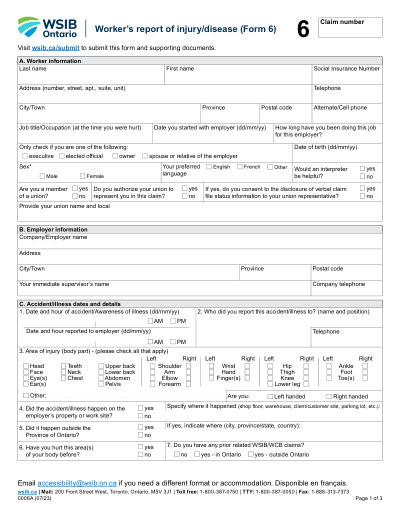
Begin by filling out Section A with your personal information.
Step 02
Complete Section B with your employer's details.
Step 03
In Section C, provide specifics about the accident or illness.
Step 04
Fill in Section D with health care information and treatments received.
Step 05
Detail any lost time from work in Section E.
Step 06
Review all entries for accuracy before submission.
WSIB 6は何に使用されますか?
WSIB 6フォームに記入する必要があるのは誰ですか
What is the purpose of Form 6?
When is Form 6 due?
Who is responsible for completing Form 6?
What if I only received first aid?
How do I sign Form 6 online?
フォームWSIB 6に記入する準備はできましたか?
数分でオンラインでフォームに記入を開始できます。高速、安全、そして完全に無料です。
Our users speak for themselves
本物の専門家によって検証された優れた品質。
"The editing was very easy and easy to download the document."
Fouzia Barwari
Jun 2, 2026
"Quick easy and straightforward thank you"
MRS DAWN ANDREWS
May 23, 2026
"Simple efficient process. It all worked."
Sundeep Salins
Jun 3, 2026
"Editing was easy. I changed some text in the file without affecting the original font or page layout"
Bhagya
May 14, 2026
よくある質問
PDFocusedとは何ですか?
PDFocusedは安全に使用できますか?
PDFocusedはサブスクリプション ベースですか、それとも1回限りの購入ですか?
PDFocusedでPDFを編集するにはどうすればよいですか?
PDFocusedにはどのようなコア機能が含まれていますか?
PDFocusedはどのようなファイル形式をサポートしていますか?
エラーが発生した場合はどうすればよいですか?
適切なオンラインPDFツールを選択するにはどうすればよいですか?
