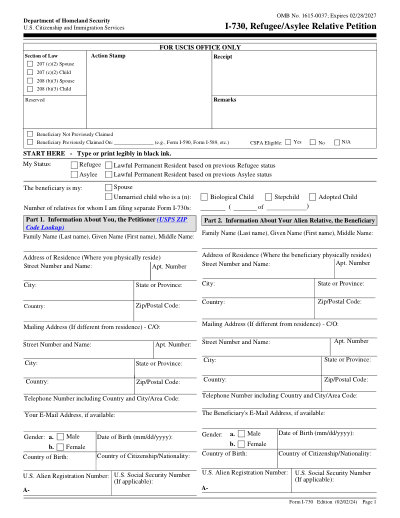
USCISフォーム I-730

2025印刷可能なテンプレート

いいですね Trustpilot stars Trustpilotで42,014件のレビュー

This website is not affiliated with any government agency or tax authority.
フォームの最終更新日: 2024 年 3 月。使用する前に、これが現在のバージョンであることを確認してください。

I-730フォームに簡単に記入して送信します

次の簡単な手順に従って、オンラインでI-730フォームに記入、署名し、送信します。

01

フォームに記入してください

ユーザーフレンドリーなエディターを使用すると、個人やビジネスの詳細をI-730テンプレートにすばやく入力できます。

02

フォームに署名する

入力可能なI-730フォームに電子署名を追加し、ご本人が送信したことを証明できます。

03

依頼者に送信します

入力済みのI-730フォームを依頼者と共有します。

オンラインでI-730に記入するにはどうすればよいですか?

オンラインでI-730フォームに記入するには、次の手順に従ってください。

Step 01

Access the form from the USCIS website or a PDF editor.

Step 02

Complete the Petitioner Information section with your details.

Step 03

Provide information about each beneficiary, including their relationship to you.

Step 04

Ensure all necessary documentation is included and specify relationships.

Step 05

Submit the completed form to USCIS within the required timeframe.

I-730は何に使用されますか?

Form I-730 is used by individuals who have been granted asylum or admitted as refugees in the U.S. to petition for their spouse and unmarried children under 21 to join them in the United States, facilitating family reunification.

I-730フォームに記入する必要があるのは誰ですか

Individuals who have been granted asylum or admitted as refugees in the U.S. and wish to petition for their spouse and unmarried children under 21.

What is Form I-730?

It is a petition that allows individuals granted asylum or admitted as refugees to request that their spouse and unmarried children under 21 join them in the U.S.

When is Form I-730 due?

It must be filed within two years of the petitioner's asylum grant or refugee admission, unless there are humanitarian reasons to excuse this deadline.

Where should I file Form I-730?

Submit the form to the appropriate USCIS address as specified in the form instructions.

Do I need to sign the form if my beneficiary is outside the U.S.?

Yes, the petitioner must sign the form regardless of the beneficiary's location.

Can I check the status of my Form I-730?

Yes, you can check your case status on the USCIS website.

フォームI-730に記入する準備はできましたか?

数分でオンラインでフォームに記入を開始できます。高速、安全、そして完全に無料です。

Our users speak for themselves

本物の専門家によって検証された優れた品質。

Great
トラストパイロット
Verified

"The folks at PDFocused were just wonderful at helping me resolve a very important issue. I would highly recommend them because there is someone actually paying attention and reaching out to help those who use their service!"

E

Eugene

Mar 20, 2026

Verified

"I wanted to convert a PDF quickly and this tool made it very easy. Everything worked great, and I didn't have to deal with any confusing process."

B

Bosmat Shelef

Feb 4, 2026

Verified

"I needed to convert a PDF quickly and this tool made it easy. Everything worked as expected and I didn't have to deal with any confusing steps."

E

Elibz

Feb 4, 2026

Verified

"Super great and easy to use"

D

Drew Mascia

Feb 28, 2026

よくある質問

PDFocusedとは何ですか?
PDFocusedは、ブラウザで直接ファイルの編集、入力、結合、分割、圧縮、回転、変換、OCRを行うのに役立つオンラインPDFおよびドキュメント ツールキットです。また、すぐに使用できるフォーム ページと、一般的なドキュメント ワークフロー用のブラウザ内エディタも提供します。
PDFocusedは安全に使用できますか?
はい。PDFocusedは、安全なインフラストラクチャや制御されたファイル ライフサイクル管理など、アップロードとアカウント フローに対するセキュリティ最優先の処理を備えて構築されています。一時ファイルは自動的に処理およびクリーンアップされ、アカウント/サブスクリプション操作は検証済みのバックエンド フローを通じて処理されます。
PDFocusedはサブスクリプション ベースですか、それとも1回限りの購入ですか?
PDFocusedは、トライアル スタイルのアクセスや定期的なオプションなど、複数のプランを備えたサブスクリプション モデルを使用します。プランの可視性はユーザー履歴 (トライアル資格など) によって異なり、特別オファーへのアクセスはアカウントの資格によって異なる場合があります。
PDFocusedでPDFを編集するにはどうすればよいですか?
PDFocusedを開いてファイルをアップロードし、エディターを起動します。フィールドに入力し、コンテンツを調整し、ドキュメント操作を適用できます。完了したら、同じワークフローから更新されたファイルをエクスポート/ダウンロードします。
PDFocusedにはどのようなコア機能が含まれていますか?
PDFocusedは、PDFの編集、フォーム入力、結合、分割、ページの削除、ページの回転、PDFの圧縮、OCR、および複数の変換ツール (PDFから画像、画像からPDF、PDFから DOCX、Office からPDF、PDFから EPUB/RTF/Excelテーブル、画像形式変換ツールなど) をサポートしています。
PDFocusedはどのようなファイル形式をサポートしていますか?
PDFocusedは主にPDFワークフローをサポートし、標準的なビジネス ワークフローで使用されるドキュメントおよび画像形式を含む、専用ツールを介した一般的なオフィスおよび画像の変換パスもサポートします。
エラーが発生した場合はどうすればよいですか?
何かが失敗した場合は、新しいアップロード/セッションで操作を1回再試行してください。問題が解決しない場合は、サイト フッターに表示されているサポート チャネルを使用してPDFocusedサポートに連絡し、チームがアカウント/セッションの詳細を調査できるようにしてください。
適切なオンラインPDFツールを選択するにはどうすればよいですか?
プラットフォームが完全なワークフロー (編集 + 変換 + 圧縮 + フォーム) をカバーし、信頼性の高いアカウント/請求処理を備え、明確なサポート チャネルによる安全な処理を提供していることを確認してください。PDFocusedはオールインワンのブラウザ ワークフローとして設計されているため、複数のツールを行き来する必要がなくなります。
/ 1
100%
