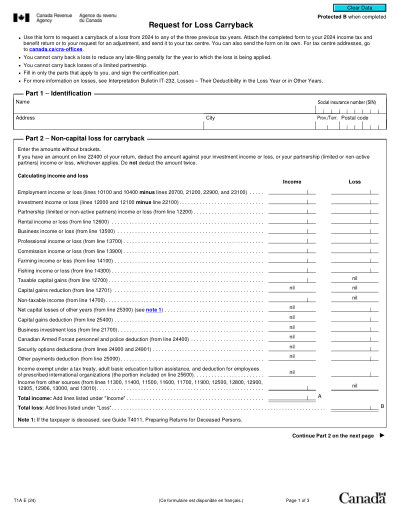
Modello stampabile 2025
This website is not affiliated with any government agency or tax authority.
Ultimo aggiornamento del modulo: 03/2024. Verifica che questa sia la versione corrente prima dell'uso.
Compila e invia facilmente il tuo modulo T1A
Segui questi semplici passaggi per compilare, firmare e inviare il tuo modulo T1A online.
Compila il modulo
Il nostro editor intuitivo ti aiuta a inserire rapidamente i dettagli personali e aziendali nel modello T1A.
Firma il modulo
Aggiungi la tua firma elettronica al modulo compilabile T1A per certificare che proviene direttamente da te.
Invialo al richiedente
Scarica e stampa immediatamente o condividi il tuo T1A firmato con il richiedente.
Come compilare un T1A online?
Segui questi passaggi per completare il tuo modulo T1A online.
Step 01
Access Form T1A from the Canada Revenue Agency website or through your tax software.
Step 02
Complete all necessary fields with accurate information.
Step 03
Review the form for any errors or missing information.
Step 04
Submit the form to the CRA as part of your tax return.
A cosa serve un T1A?
Chi deve compilare un modulo T1A
What does loss carryback mean?
What documents are needed when filing Form T1A?
Can I carry forward unused losses if my Form T1A request is denied?
Pronto a compilare il tuo modulo T1A?
Inizia a compilare il tuo modulo online in pochi minuti. Veloce, sicuro e completamente gratuito.
Our users speak for themselves
Qualità eccezionale verificata da veri professionisti.
"The editing was very easy and easy to download the document."
Fouzia Barwari
Jun 2, 2026
"Quick easy and straightforward thank you"
MRS DAWN ANDREWS
May 23, 2026
"Simple efficient process. It all worked."
Sundeep Salins
Jun 3, 2026
"Editing was easy. I changed some text in the file without affecting the original font or page layout"
Bhagya
May 14, 2026
Domande frequenti
Che cos'è PDFocused?
È sicuro usare PDFocused?
PDFocused è in abbonamento o con acquisto unico?
Come faccio a modificare un PDF su PDFocused?
Quali sono le funzionalità principali di PDFocused?
Quali tipi di file supporta PDFocused?
Cosa devo fare se riscontro un errore?
Come scegliere il giusto strumento PDF online?
