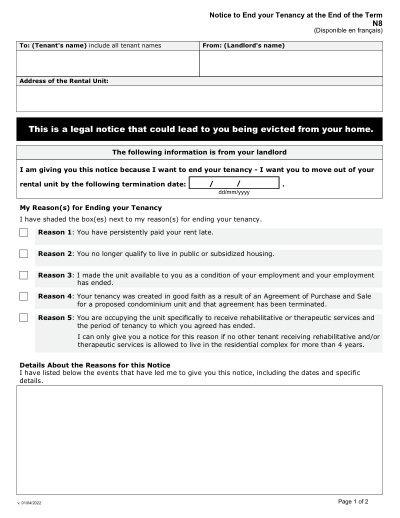
Modulo Other N8

Modello stampabile 2025

Ottimo Trustpilot stars 42.014 recensioni su

This website is not affiliated with any government agency or tax authority.
Ultimo aggiornamento del modulo: 03/2024. Verifica che questa sia la versione corrente prima dell'uso.

Compila e invia facilmente il tuo modulo N8

Segui questi semplici passaggi per compilare, firmare e inviare il tuo modulo N8 online.

01

Compila il modulo

Il nostro editor intuitivo ti aiuta a inserire rapidamente i dettagli personali e aziendali nel modello N8.

02

Firma il modulo

Aggiungi la tua firma elettronica al modulo compilabile N8 per certificare che proviene direttamente da te.

03

Invialo al richiedente

Scarica e stampa immediatamente o condividi il tuo N8 firmato con il richiedente.

Come compilare un N8 online?

Segui questi passaggi per completare il tuo modulo N8 online.

Step 01

Access the form from the Landlord and Tenant Board website or a PDF editor.

Step 02

Complete all required fields accurately.

Step 03

Set the appropriate termination date based on the tenancy type and legal requirements.

Step 04

Deliver the completed notice to the tenant according to Landlord and Tenant Board regulations.

Step 05

Retain a copy of the filled form for your records.

A cosa serve un N8?

Form N8 is used by landlords in Ontario to notify tenants of the termination of a tenancy agreement at the end of the term for reasons such as persistent late rent payments or other breaches of the lease agreement. This form ensures that both parties are informed of the termination process and their rights.

Chi deve compilare un modulo N8

Landlords in Ontario who need to terminate a tenancy at the end of the term for specific reasons.

What is Form N8?

Form N8 is a legal document used by landlords in Ontario to formally end a tenancy agreement at the end of the term for specific reasons.

When is Form N8 required?

It is required when landlords need to terminate a tenancy at the end of the term for reasons such as persistent late rent payments or other qualifying issues.

How long before the termination date must the notice be given?

For monthly tenancies, the notice must be given at least 60 days before the termination date.

What happens if a tenant disputes the notice?

Tenants can contest the notice at a hearing before the Landlord and Tenant Board.

Where should Form N8 be submitted?

The completed form must be delivered to the tenant, and a copy should be retained by the landlord for records.

Pronto a compilare il tuo modulo N8?

Inizia a compilare il tuo modulo online in pochi minuti. Veloce, sicuro e completamente gratuito.

Our users speak for themselves

Qualità eccezionale verificata da veri professionisti.

Great
Trustpilot
Verified

"The folks at PDFocused were just wonderful at helping me resolve a very important issue. I would highly recommend them because there is someone actually paying attention and reaching out to help those who use their service!"

E

Eugene

Mar 20, 2026

Verified

"I wanted to convert a PDF quickly and this tool made it very easy. Everything worked great, and I didn't have to deal with any confusing process."

B

Bosmat Shelef

Feb 4, 2026

Verified

"I needed to convert a PDF quickly and this tool made it easy. Everything worked as expected and I didn't have to deal with any confusing steps."

E

Elibz

Feb 4, 2026

Verified

"Super great and easy to use"

D

Drew Mascia

Feb 28, 2026

Domande frequenti

Che cos'è PDFocused?
PDFocused è un toolkit online per PDF e documenti che ti aiuta a modificare, compilare, unire, dividere, comprimere, ruotare, convertire ed eseguire l'OCR dei file direttamente nel tuo browser. Offre anche pagine di moduli pronti all'uso e un editor nel browser per i flussi di lavoro documentali più comuni.
È sicuro usare PDFocused?
Sì. PDFocused è progettato con un approccio orientato alla sicurezza per caricamenti e account, con infrastruttura sicura e gestione controllata del ciclo di vita dei file. I file temporanei vengono elaborati ed eliminati automaticamente; le operazioni su account e abbonamenti sono gestite tramite flussi backend verificati.
PDFocused è in abbonamento o con acquisto unico?
PDFocused utilizza un modello in abbonamento con più piani, incluso l'accesso in stile prova e opzioni ricorrenti. La visibilità del piano può variare in base alla cronologia dell'utente (ad esempio, idoneità alla prova) e l'accesso a offerte speciali può dipendere dall'idoneità dell'account.
Come faccio a modificare un PDF su PDFocused?
Apri PDFocused, carica il tuo file e avvia l'editor. Puoi compilare i campi, modificare il contenuto e applicare operazioni sui documenti. Quando hai finito, esporta/scarica il file aggiornato dallo stesso flusso di lavoro.
Quali sono le funzionalità principali di PDFocused?
PDFocused supporta la modifica PDF, la compilazione di moduli, l'unione, la divisione, l'eliminazione di pagine, la rotazione di pagine, la compressione PDF, l'OCR e numerosi strumenti di conversione (come PDF in immagini, immagini in PDF, PDF in DOCX, office in PDF, PDF in EPUB/RTF/tabelle Excel e strumenti di conversione di formati immagine).
Quali tipi di file supporta PDFocused?
PDFocused supporta principalmente flussi di lavoro PDF e offre anche strumenti dedicati per convertire i formati Office e immagine più comuni, inclusi i formati usati nei normali flussi aziendali.
Cosa devo fare se riscontro un errore?
Se qualcosa non funziona, riprova l'operazione una volta con un nuovo caricamento/sessione. Se il problema persiste, contatta l'assistenza di PDFocused utilizzando il canale di supporto mostrato nel footer del sito in modo che il team possa indagare con i dettagli del tuo account/sessione.
Come scegliere il giusto strumento PDF online?

Verifica che la piattaforma copra l'intero flusso di lavoro (modifica + conversione + compressione + moduli), abbia una gestione affidabile di account/fatturazione e fornisca un'elaborazione sicura con canali di supporto chiari. PDFocused è progettato come un flusso di lavoro completo nel browser così puoi evitare di passare da uno strumento all'altro.
/ 1
100%